DMS vs Fileshare – Teil 1: Allgemein

wo liegen eigentlich die unterschiede zwischen einem normalen fileshare und einem dms? 

diese frage ist ansich ziemlich eigenartig, weil man die beiden technologien aufgrund ihres unterschiedlichen ansatzes gar nicht vergleichen kann; das ist auf der einen seite ein bisschen so wie äpfel mit birnen vergleichen, auf der anderen seite jedoch eine frage, die ich bereits oft gestellt bekommen habe und damit doch legitim ist. der fokus liegt hier natürlich auf vergleichbaren features; dass z.b. ein normaler fileshare beim einscannen von papierdokumenten wenig hilfreich ist, sollte ohnehin jedem klar sein nehme ich mal an 😉

ich habe die unterschiede in 5 teilen durchleuchtet; starten wir mit dem ersten: allgemeine unterschiede

  Document Management System Fileshare
generelle Benutzerfreundlichkeit für die Anwender zum überwiegenden Teil eher verwirrend; es gibt je nach Produkt mitunter mehrere Tools, um Tasks zu erledigen, wobei jedes Tool für sich meist nicht alle Funktionalitäten bietet   sehr einfach; gibt es schon ewig, “jeder kann damit umgehen”
Zugriffsmöglichkeiten primär per Web-Frontend, je nach Produkt auch über Webdav, CIFS und eigene (meist Windows-) Clients   primär per CIFS; rein theoretisch auch über IIS und WebDav möglich
Verzeichnisstruktur mit einem richtigen und gelebten Konzept durch Metadaten, Suche und virtuellen Views im Idealfall nebensächlich. Navigation in den Foldern je nach Produkt aber eher unkonfortabel   Sehr gute Foldernavigation
Integration in Desktop Applikationen direktes Speichern und Laden nicht immer möglich   direktes Speichern und Laden möglich
Performance im Vergleich zu Fileshares meist langsamer   akzeptabel
Backup / Restore Je nach Produkt (Trennung Datenbank mit Document Store) aufwendiger; basiert auf Transaktionen, daher Rollback möglich   Backup ist einfach; Fileshare basiert aber nicht auf Transaktionen, daher Rollback nicht möglich (Workaround: Volume Shadow Copy)
Archived: ecm

Microsoft Office SharePoint Server 2007 VHD

… wer eine schnelle testumgebung benötigt – und virtual server 2005 r2 installiert hat – sollte sich dieses vhd image ansehen:

This download enables you evaluate Microsoft Office SharePoint Server 2007. Microsoft Office SharePoint Server 2007 is an integrated suite of server capabilities that can help improve organizational effectiveness by providing comprehensive content management and enterprise search, accelerating shared business processes, and facilitating information-sharing across boundaries for better business insight. Office SharePoint Server 2007 supports all intranet, extranet, and Web applications across an enterprise within one integrated platform, instead of relying on separate fragmented systems. Additionally, this collaboration and content management server provides IT professionals and developers with the platform and tools they need for server administration, application extensibility, and interoperability.

Enterprise Search Training – for free!

kaum zu glauben – massenhaft videos, und dann auch noch gratis!

Deep technical training from Microsoft is rare, and where it does exist, it’s virtually never free…

We have worked with the SharePoint Product Group, the US Partner Readiness Group, and Microsoft Studios to produce high-quality, technically deep training. And guess what? It’s FREE!

folgendes erwartet euch:

Module 1 – Introduction
Module 2 – Enterprise Search Overview
Module 3 – SharePoint Search Walkthrough
Module 4 – Search Architecture and Deployment
Module 5 – Crawl and Query Processes
Module 6 – Relevance Ranking
Module 7 – Customizing the End-User Experience
Module 8 – Developing Search Solutions
Module 9 – Business Data Catalog Search
Module 10 – Extensibility and Integration for Search
Module 11 – Search Administration
Module 12 – Security for Search
Module 13 – Performance, Scalability, and Capacity Planning
Module 14 – Search Operations

Quest Discovery Wizard for SharePoint

es ist nicht ĂŒberraschend, dass man gerne einen ĂŒberblick haben möchte, wo es in der firma ĂŒberall sharepoint installationen gibt – das problem habe ich ja bereits einmal kurz angesprochen, und microsoft selbst hat mit dem sharepoint asset inventory tool eine lösung parat, die allerdings noch beta ist und leider damit auch nicht gerade optimal funktioniert.

eben habe ich eine alternative gefunden: den Discovery Wizard for SharePoint von quest software – auch dieser widmet sich dem genannten problem:

Do you know how many Microsoft SharePoint servers, site collections or sites are on your network? Discovery Wizard for SharePoint freeware gathers critical data about your SharePoint inventory (SPS and WSS) and displays the discovered results in two easy to read, HTML reports.

… steht nun auf meiner todo liste; bin gespannt, ob dieses tool besser als das von ms funktioniert.

ps: es ist freeware!

ECM Projekte

enterprise content management ist ja “relativ neu” – es handelt sich dabei mehr um einen idealzustand, um eine theorie. trotzdem kann es zum einen jeder hersteller und zum anderen wissen die kunden genau, was sie wollen. :mrgreen:

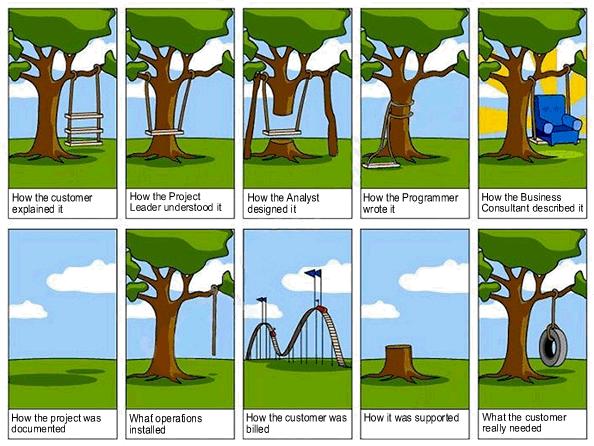
da ist mir wieder dieses bildchen eingefallen; ja, dies gilt auch – oder vielleicht sogar vor allem – fĂŒr ecm projekte:

ecm project lifecycle

Archived: ecm

Access Fileserver Data via SharePoint

ein geniales webpart gibt es bei hezser.de:

I guess everybody knows this scenario. You are with a customer or at home, and need a file from your company’s fileserver very badly. What can you do? VPN is not possible, and you can’t phone a colleague who can then send you the file via email because nobody is in the office. Don’t bother any more. The solution is here

With my Webpart you can access files from e.g. your fileserver via SharePoint / Browser.

All you have to do is install the solution, activate and deploy it. When you drag the Webpart onto a SharePoint page, you configure the root path from which you want to share data, and your users are able to download the files through the Webpart.

All files and folders are security trimmed. Meaning you can only download files and see folders, which you would see on the directory itself.

To BLOB or Not To BLOB

passend zu dem artikel use External BLOB Storage in WSS / MOSS habe ich eine publikation bei ms research gefunden: To BLOB or Not To BLOB: Large Object Storage in a Database or a Filesystem?

kurz gesagt ist die performance bei objekten kleiner als 256kb in der datenbank besser, bei objekten grĂ¶ĂŸer als 1 mb auf dem filesystem. tatsĂ€chlich werden heutzutage dokumente eher grĂ¶ĂŸer als 1 mb sein; daher wĂ€re ein externer document store auf jeden fall besser geeignet

Powerpoint Generator (Beta)

– Deutsche Version / English Version follows below –

vor allem techniker kennen das problem nur zu gut: es hilft ĂŒberhaupt nichts, noch so tolle und bis ins letzte detail technisch ausformulierte dokumente zu verfassen – um entscheidungstrĂ€ger zu erreichen, muss man die fakten und das ziel, welches man abgenickt haben möchte, in eine schöne powerpoint prĂ€sentation verpacken.

ich fand es schon immer mĂŒhsam, dass sich die zu verwendenden vorlagen wie das amen im gebet regelmĂ€ĂŸig Ă€ndern – schließlich kommt es natĂŒrlich sehr oft vor, dass teile einer neuen prĂ€sentation per copy & paste aus bereits bestehenden powerpoints entstehen. da die prĂ€sentation aber natĂŒrlich ci konform sein muss bzw angaben zum thema und oder verfasser nicht einfach ĂŒbernommen werden sollen, kann man nicht einfach ganze folien kopieren – sondern hat dabei zusĂ€tzlichen aufwand.

besser wĂ€re es, wenn man dafĂŒr keine zeit aufbringen mĂŒsste, sondern sich ganz dem inhalt widmen kann – denn bei dem eigentlichen inhalt der prĂ€sentation kann einem kein mechanismus helfen.

wÀre es nicht praktisch, wenn ein tool
– eine fertige prĂ€sentation auf basis eines templates umbaut? (formatierungen, etc – kurz „rebranding“…)
– auf basis des inhaltes einen passenden header (ĂŒberschriften etc) generiert?
– einen einheitlichen footer erstellt?
– die auflösung von enthaltenen bildern anpasst, sodass platz gespart wird?
– die prĂ€sentation automatisch mit zum thema passenden bildern auflockert?

ich bin gerade dabei, so ein tool zu entwickeln. meine ursprĂŒngliche idee – der neuaufbau einer prĂ€sentation mit dem look & feel aus einem neuen template – hat so gut funktioniert (auch wenn man das natĂŒrlich nicht sollte: in wenigen augenblicken wird so aus einer prĂ€sentation der konkurrenz eine eigene 😉 – rein theoretisch natĂŒrlich), dass ich auch noch die erstellung des headers und des footers, sowie das automatische hinzufĂŒgen von zum thema passenden bildern von flickr realisiert habe. vor allem letzteres ist zwar noch beta, kann aber denke ich viel bringen; denn zum inhalt passende bilder unterstĂŒtzen den transport des wesentlichen enorm.
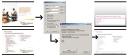
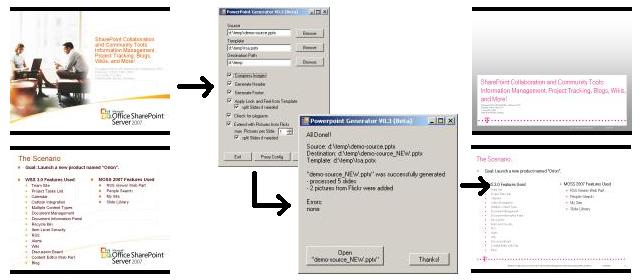
Powerpoint Generator

ich bin am ĂŒberlegen, ob ich das tool zum download anbieten soll; jedenfalls möchte ich zuvor ĂŒberprĂŒfen, ob ĂŒberhaupt genug interesse besteht. daher möchte ich eine art bedarfserhebung starten: könntest du das tool brauchen? wenn ja, dann hinterlasse bitte einen kommentar mit der anmerkung, wofĂŒr. und auch erweiterungsvorschlĂ€ge sind gerne willkommen.

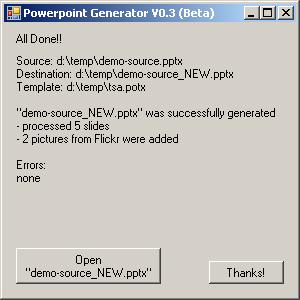
Zum abschluss noch ein paar screenshots:
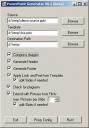
Powerpoint Generator Settings

Powerpoint Generator Finished

– English Version –

Mainly technicians know this problem very well: it doesn’t help at all just to create perfect documents, which elaborate technical details – to be able to reach the decision making people, the facts and the goal you want to emphasize, have to be packed into a nice PowerPoint presentation.

I always found it tedious, that the master templates are changed on a regularly basis – it naturally often occurs, that parts of a new presentation are produced through “copy & paste” out of an existing presentation. But of course, because the presentation must be CI consistent and general information regarding theme and or author cannot simply be copied, it is not possible to just copy the whole slide – and therefore additional work is created.

Wouldn’t it be better, if you didn’t need to use time and effort for this and could concentrate completely on the subject and contents – as there is no kind of mechanism, which can help with the contents of the presentation?

Wouldn’t it be useful, if a tool
– could build a finished presentation from a basis of templates? (Formatting, etc – brief “rebranding”
)
– could generate a suitable header on the basis of the content?
– could create a consistent foot note?
– could adjust the resolution of included pictures, so space can be saved?
– could loosen up the presentation with pictures suitable taken from flickr?

I am currently working on developing such a tool. My original idea – rebuilding a presentation with the “look and feel” of a new template – did work out very well (even when one shouldn’t: within a few seconds a presentation from the competitor turns into your own 😉 – just theoretically of course), so I implemented the creation of header and foot note as well as the automation of adding suitable pictures too. The later is still beta, but I’m sure it’s going to accomplish a lot, because pictures suitable with the subject help to emphasize the main subject.

Powerpoint Generator

I am still considering, whether I should offer the tool to download; anyway I want to check first if there are enough people interested, therefore I would like to start a sort of first survey of demand: could you use this tool? If yes, then please leave a comment stating what for and ideas for further improvements are also welcome.

a few screenshots:

Powerpoint Generator Settings

Powerpoint Generator Finished

ein Feed ĂŒber alle MySite Blogs?

geht das? out of the box nicht – man kann nur den feed blog fĂŒr blog im feedreader seiner wahl abonieren, aber nicht alle auf einmal; und schon gar nicht kann man zu neuen blogs automatisch subscriben.

die lösung wĂ€re also eine art “master feed” – ein feed, indem einfach automatisch alle feeds der vorhandenen blogs enthalten sind. somit ist also auch ein neues blog automatisch enthalten.

steven van de craen hat eine solution erstellt, die genau so einen “master feed” generiert – er bietet diese zum glĂŒck zum download an; sogar der source code steht zur verfĂŒgung.

WordPress 2.5

… wie aus diesem kurzen screencast meiner meinung nach sehr eindrucksvoll ersichtlich ist, erwarten uns in der version 2.5 viele neue features. der release wurde ja leider verschoben, aber nun ist es endlich soweitwordpress 2.5 steht zum download bereit!

ich hatte im vorfeld leider nicht die zeit, die verfĂŒgbarkeit fĂŒr 2.5 der von mir verwendeten plugins zu ĂŒberprĂŒfen; möchte das aber asap nachholen – schließlich möchte ich so schnell wie möglich die neuen features verwenden!